


The best Snipping Tool alternatives for Windows are software applications that’ll let you capture the screen of your Windows PC. While there are plenty of these tools online, it’s hard to know which ones that work best. But that’s not something to worry about because we’ve got you covered here at NaijaKnowHow.
Capturing screenshots on Windows comes in different ways, it’s unlike the smartphone method on Android, iOS or iPadOS. We know that with just a tap on the power button + volume up or down, a screenshot image will be presented. Well, it’s quite the opposite for Windows and that’s why Snipping Tool was developed. Snipping Tool is a free screenshot tool that comes as default on Windows OS. You can use it to capture anywhere on your screen and it also comes with a little editing functions. There’s a downside to using Snipping Tool though and that’s because it lacks advanced features.
But that’s not something to worry about because there are other alternatives that can be considered. In this article, you’ll discover the best Snipping Tool alternatives for Windows. With these tools, you’ll be able to take screenshots on your Windows PC and they also offer basic editing features.
List of The Best Snipping Tools Alternatives for Windows
Whether you’re looking for a screenshot tool that offers more annotation features, flexibility and speed. With the list of alternatives to Snipping Tool that have been handpicked below, you’ll surely find one that will suit your needs. The good thing is that they can be downloaded on Windows 8, Windows 10 and Windows 11. So regardless of the OS you use aside from Windows 7, these screenshot apps will work for you.
1. Skitch
One of the most popular tools for taking screenshots on Windows is Skitch. Developed by the same people who designed the popular note-taking app called Evernote. Skitch offers a simple and straightforward way to take screenshots on a PC. The app is also available on mobile devices as well, you can have it on your Android, iPhone or iPad. With Skitch, you can easily capture screenshots of the entire screen, specific windows, or custom regions. Once you’ve captured your screen, Skitch also offers basic annotation tools that can be used on captured images. The tool includes arrows, shapes, text, and highlights, you can as well sync your images with other supported cloud storage apps on Skitch.
One of the reasons you should use Skitch is due to its integration with Evernote. Let’s say maybe you have some notes you’re working on via Evernote and images via Skitch. You can easily grab these images without having to download them first or upload them from your manual drive. Skitch also offers options to export screenshots in different formats and sizes, making it versatile for various use cases. Whether you need to capture and annotate screenshots for work, personal projects, or educational purposes. Skitch happens to be one of the best Snipping Tool alternatives that’ll work better for you.
2. Greenshot

Greenshot is a very popular screenshot tool and it’s an open-source alternative to Snipping Tool and it also offers better features. There are different ways in which you can make screenshots with this software. With Greenshot installed on your PC, you’ll be able to capture anywhere on your Windows screen. Being able to explore different annotation tools is one reason why Greenshot is a better alternative to Snipping Tool. Aside from boxes, shapes and arrows, Greenshot also allows users to add texts and watermarks to captured images. Unlike most screenshot tools, Greenshot supports additional features for capturing screens. Let’s say for example you want to capture an entire webpage, Greenshot supports scrolling screenshots. This is quite similar to some Android and iOS apps to take scrolling screenshots.
Another notable feature of Greenshot is its extensive customization options. You can define custom keyboard shortcuts, and choose preferred file formats and quality settings. There are also additional settings that’ll let you configure automatic file saving or printing after capturing a screenshot. In addition to sharing or saving captured screenshots, Greenshot offers different ways to share images. You can share your screenshots via apps like Gmail, social media apps and instant messaging apps like WhatsApp and Telegram. The software is open-source and that’s one of the core benefits of using it as an alternative to Snipping Tool.
3. Snip & Sketch
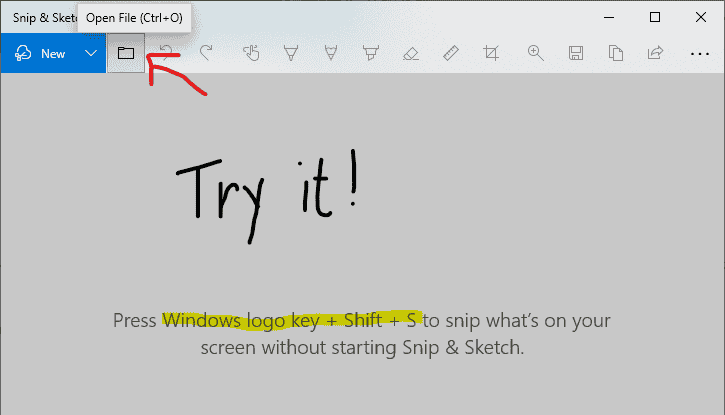
Just like Snipping Tool, Snip & Sketch is an alternative screen capture tool that was developed by Microsoft and it comes with Windows 10. If you’re a Windows 10 or Windows 11 user, you’d have come across this application quite a number of times. Snip & Skitch is more of an upgraded version of Snipping Tool for Windows users. You can take screenshots of your full Windows screen, selected regions and so on. In terms of annotations, Skip & Sketch offers annotation tools like pens, highlighters, and shapes. Once you capture screens, you can easily edit them directly from the Snip & Sketch interface. The app also allows users to save or share their screenshots directly from the Snip & Sketch app.
One of the notable features of Snip & Sketch is its timer delay, it offers different timing options to take screenshots. From 3 seconds to 10 seconds, you can time yourself for a couple of periods before taking captures. Snip & Sketch is very easy and that’s one of the cool features about it. This tool is also integrated with Windows Ink Workspace, which makes screen capture and annotations very easy. Additionally, the app provides a ruler and protractor tool for precise measurements on the captured screenshots. Snip & Skitch is one of the best Snipping Tool alternatives on Windows.
4. ShareX

ShareX is a powerful and feature-packed snipping tool alternative that offers an extensive range of screenshot capture and editing capabilities. It supports various capture methods, including full screen, region, window, and even scrolling capture. There’s a lot you can do with ShareX aside from taking screenshots. It offers other features such as screencast recording and screen recording with audio. ShareX offers advanced editing features, such as annotations, blur, adding watermarks, and applying effects. Taking screenshots and recording also comes as one of the least advanced features offered by ShareX. It also supports OCR which enables text extraction from screenshots. Well, if you look at the best OCR software, ShareX comes in the top 5.
ShareX offers a wide range of customization tools and different options for defining hotkeys. There are some preset screen capture settings that come by default on ShareX, but there’s an option to adjust them. Furthermore, ShareX also allows users to easily take screenshots and save or host them online. If you want to save your screenshots to websites like Pixabay, Photobucket or even on services like Google Photos. Additionally, sharing captures to Facebook, Instagram, Twitter and Pinterest is also feasible with ShareX. One of the reasons you should use ShareX is because it receives regular updates. This lets you explore fresh features and bug fixes, it’s a highly regarded alternative to Snipping Tool.
5. Lightshot
Another screen capture tool on the list is Lightshot and it is highly regarded as one of the best Snipping Tool alternatives. Well, that’s because it is a lightweight and user-friendly screen capture tool that offers speed and simplicity. There are no areas on your screen that this tool can’t take captures from. With just a few clicks and a well-positioned area to capture on your screen, Lightshot makes it super easy. It offers a straightforward interface that allows users to select the desired area for capture using a simple drag-and-drop gesture. While it might not have the best editing capabilities, it still offers the basic annotation tools that’ll let you add texts, shapes and arrows.
Fast performance due to its lightweight nature is one reason why you should use Lightshot. This tool is as fast as the Windows snipping tool itself and it is perfect for low-end users. After capturing a screenshot, you can quickly edit it within the Lightshot editor, which offers basic editing options like cropping, resizing, and adding text. Lightshot also allows for easy sharing of screenshots through direct links or by saving them locally. The best part of all is Lightshot’s online storage, you can upload and store all your screenshots there without losing them.
6. Ksnip

Ksnip is one of the best screen capture tools for Windows users and it shares similarities with Lightshot. But tools are lightweight and they offer an easy-to-use feature for capturing screens. With Ksnip, you can capture screenshots of the entire screen, specific windows, or custom regions. Ksnip provides basic annotation tools that’ll let you highlight specific areas or add explanations to your screenshots. The difference between Ksnip and Snipping Tool or other screen capture tools is their output formats. Captured screens on Ksnip can be exported to different formats such as PNG, JPEG, and BMP. This gives users a glimpse of their images in different qualities.
Some additional features aside from annotations include a built-in image editor. You’ll be able to reside, crop or blur any area from your captured screen. Furthermore, Ksnip also provides options for capturing delayed screenshots. This makes it easier to get the perfect screenshot you want. The lightweight nature of Ksnip makes it one of the best Snipping Tool alternatives for Windows.
Conclusion
Overall, these are the best Snipping Tool alternatives for Windows. With these screen capture tools, you’ll be able to capture and edit any area on your Windows screen. They’re mostly free and can be downloaded without any issues.



