NaijaknowhowNaijaknowhowNaijaknowhow
  • Home
  • Guides
  • Apps & Software
  • Tech News
  • Phones
    • iPhone
    • Infinix
    • Nokia
    • OPPO
    • Samsung
    • TECNO
    • Xiaomi
    • More Phones
      • HONOR
      • Huawei
      • Gionee
      • Innjoo
      • itel
      • LEAGOO
      • Lenovo
      • LG
      • Motorola
      • Sony
      • Vivo
      • Other Smartphones
  • More
    • Internet & data
      • Telcos
      • Internet & Data
      • Call Tariffs
    • Operating System
      • Android
      • Apple iOS
      • iPadOS
      • macOS
      • Windows
    • Banking & Finance
    • Buying Guide
    • Computers
    • Gaming
    • Video Tutorial
    • Gadgets
    • Accessories
    • Online Business
    • Wearables
    • Featured
  • Advertise
  • Contact Us
  • My Bookmarks
Search
  • Customize Interests
  • About Us
  • Contact
  • Advertise
© NAIJAKNOWHOW MEDIA
Notification Show More
Font ResizerAa
NaijaknowhowNaijaknowhow
Font ResizerAa
Search
  • Home
  • Guides
  • Apps & Software
  • Tech News
  • Phones
    • iPhone
    • Infinix
    • Nokia
    • OPPO
    • Samsung
    • TECNO
    • Xiaomi
    • More Phones
  • More
    • Internet & data
    • Operating System
    • Banking & Finance
    • Buying Guide
    • Computers
    • Gaming
    • Video Tutorial
    • Gadgets
    • Accessories
    • Online Business
    • Wearables
    • Featured
  • Advertise
  • Contact Us
  • My Bookmarks
Follow US
  • About Us
  • Advertise
  • Banner Ads
  • Contact Us
  • Privacy Policy
  • Disclaimer
© NAIJAKNOWHOW MEDIA
Apple iOSOperating SystemTech NewsTech Tutor

iOS 16/17 Could Reduce Your iPhone Battery Life (Here’s How to Make Your Battery Last Longer Everyday)

Did you know that iOS 16 or 17 on your iPhone could reduce your battery life? Read to see how to make your battery last long each day.

By
Miracle
Last updated: January 13, 2025
Share
4 Min Read
SHARE

The iPhone keyboard now has a new feature called “haptic feedback” with iOS 16. (Please don’t confuse iOS 16 with iPhone 16. As at this time, iPhone 16 as a phone model is not yet out.)

Contents
  • How to Make Your iOS 16/17 iPhone Battery Last Longer
    • 1. Turn off haptic feedback
    • 2. Remove widgets from your iPhone lock screen
    • 3. Check your battery health and identify battery-draining apps
  • Conclusion

The haptic feedback feature makes the phone vibrate slightly with each key press, giving a more immersive typing experience. However, according to this Apple support page, this feature might use up more battery life. If you want to save battery, you should turn off this feature.

How to Make Your iOS 16/17 iPhone Battery Last Longer

1. Turn off haptic feedback

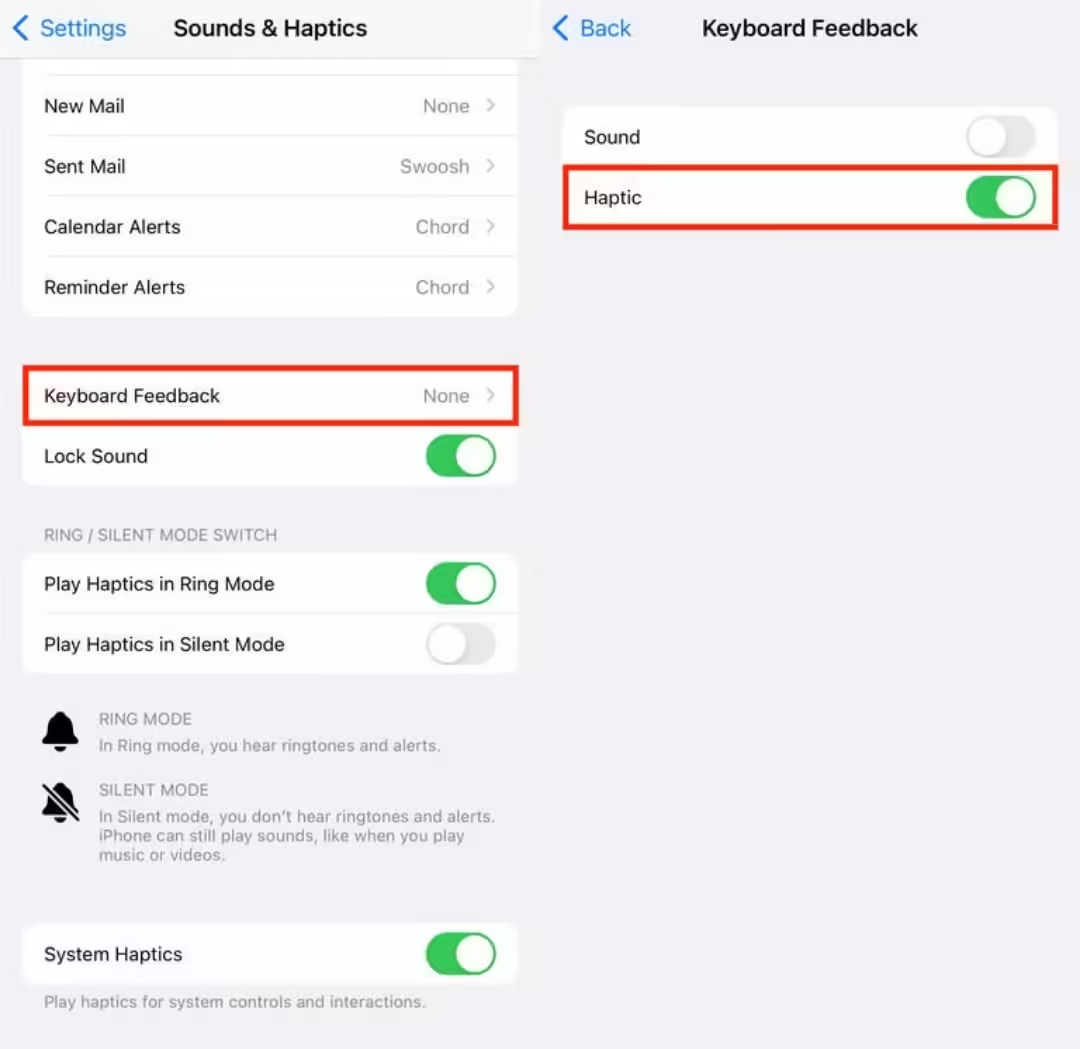
Haptic feedback is off by default. If you’ve turned it on and want to save battery, go to Settings > Sounds & Haptics > Keyboard Feedback and switch off Haptic.
iOS 16/17 iPhone Battery

2. Remove widgets from your iPhone lock screen

Widgets on your lock screen can drain your battery because they keep apps running in the background to update the information displayed, like weather or sports scores. To save battery, avoid using widgets on your lock screen (and home screen).

To remove widgets, press down on your lock screen. Swipe to choose a lock screen without widgets or press Customize. Select Lock Screen, tap the widget box, and remove each widget by pressing the “—” button.

3. Check your battery health and identify battery-draining apps

With iOS 17.4, Apple made it easier to track your iPhone’s battery life and health. In the Settings app, the Battery submenu now clearly shows your battery’s overall health status.

Also Read:  14 Best Sites Like TFPDL to Download Movies and Series (2026)

Previously, you could see your battery’s capacity percentage in the Battery Health & Charging section (over 80% is considered good). Now, the Battery Health menu shows whether your battery is in good condition or not.

Some apps use more battery than others, especially those that track your location, stream videos, or run graphics-intensive games. If your phone heats up, it’s likely that the app is draining your battery fast.

To see which apps are using the most battery, go to the Battery menu in Settings, check which apps take up the biggest percentage of your screen time. Also look at the Insights and Suggestions section for tips on improving battery life.

Apps like Instagram and TikTok often drain a lot of battery. If you want to save battery, consider removing such apps by long-pressing their icons and clicking the “x” in the corner.

Alternatively, you can limit your use of these apps. Put them in a folder to keep them out of sight or set time limits. To set a time limit, go to Settings, then to Screen Time. Tap App Limits. Then tap Add Limit to choose categories or specific apps to limit.

Conclusion

There are many other ways to extend your iOS 16/17 iPhone battery life. These tips also work for older iOS versions. Additional methods include lowering screen brightness, enabling low power mode, switching to 4G LTE if 5G signals are weak, turning off Location Services, disabling Always On Display, and replacing your battery if needed.

6 Best LibreOffice Alternatives for PC (Free/Paid) in 2023
Best PDF Compression Apps to Compress PDF in 2024
Apple Announces iPad Air 2019 and New iPad Mini
10 Calligraphy Apps to Improve Your Handwriting in 2024
How to Save GIFs on Android Devices Easily (2023)
TAGGED:iOS 16iOS 17iPhone battery life
Share This Article
Facebook Whatsapp Whatsapp
Share
Miracle Emmanuel
ByMiracle
Follow:
A Crypto Analyst | Content Writer | Graphics Designer | Movie Freak | Currently learning Blockchain Development. I like Team Work. Connect with me using the buttons below. Want to advertise on Naijaknowhow Media? Please click here to send a message.
Previous Article Redmi K70 Ultra Lamborghini Edition to Be Launched With the Extreme Edition Series
Next Article Bing to Now Prioritize AI Search Results
Leave a Comment Leave a Comment

Hey fam, don't go without a reply!Cancel reply

Ad imageAd image
- Advertisement -

Latest News

how to recover hacked facebook account
How to Recover Hacked Facebook Account (2026 Working Methods)
Tech Tutor
January 5, 2026
sell used phone in nigeria
8 Places To Sell Your Used Phones in Nigeria (Online & Offline Options)
Buying Guide
January 5, 2026
Netflix movie streaming service
9 Best Netflix Alternatives To Stream For Free in 2026
Android Apps & Software Internet & Data
January 5, 2026
Goojara Alternatives
Best Goojara Alternatives to Watch Movies Online (2026)
Internet & Data
January 4, 2026

Stay Connected

5.9KFollowersLike
2.2KFollowersFollow
1.6KFollowersPin
1.2KFollowersFollow
1.9KSubscribersSubscribe
500FollowersFollow
637MembersFollow
NaijaknowhowNaijaknowhow
Follow US
© NAIJAKNOWHOW MEDIA (BN 2738473) | 2015 - 2025 All Rights Reserved.
  • About Us
  • Advertise
  • Banner Ads
  • Contact Us
  • Privacy Policy
  • Disclaimer
X
GET EXCLUSIVE CONTENT
SUBSCRIBE TO OUR CHANNEL