


NaijaknowhowNaijaknowhowNaijaknowhow
  • Home
  • Guides
  • Apps & Software
  • Tech News
  • Phones
    • iPhone
    • Infinix
    • Nokia
    • OPPO
    • Samsung
    • TECNO
    • Xiaomi
    • More Phones
      • HONOR
      • Huawei
      • Gionee
      • Innjoo
      • itel
      • LEAGOO
      • Lenovo
      • LG
      • Motorola
      • Sony
      • Vivo
      • Other Smartphones
  • More
    • Internet & data
      • Telcos
      • Internet & Data
      • Call Tariffs
    • Operating System
      • Android
      • Apple iOS
      • iPadOS
      • macOS
      • Windows
    • Banking & Finance
    • Buying Guide
    • Computers
    • Gaming
    • Video Tutorial
    • Gadgets
    • Accessories
    • Online Business
    • Wearables
    • Featured
  • Advertise
  • Contact Us
  • My Bookmarks
Search
  • Customize Interests
  • About Us
  • Contact
  • Advertise
© NAIJAKNOWHOW MEDIA
Notification Show More
Font ResizerAa
NaijaknowhowNaijaknowhow
Font ResizerAa
Search
  • Home
  • Guides
  • Apps & Software
  • Tech News
  • Phones
    • iPhone
    • Infinix
    • Nokia
    • OPPO
    • Samsung
    • TECNO
    • Xiaomi
    • More Phones
  • More
    • Internet & data
    • Operating System
    • Banking & Finance
    • Buying Guide
    • Computers
    • Gaming
    • Video Tutorial
    • Gadgets
    • Accessories
    • Online Business
    • Wearables
    • Featured
  • Advertise
  • Contact Us
  • My Bookmarks
Follow US
  • About Us
  • Advertise
  • Banner Ads
  • Contact Us
  • Privacy Policy
  • Disclaimer
© NAIJAKNOWHOW MEDIA
Apps & SoftwareTech News

Google Lens Video Search Feature Now Available

This Google Lens video search feature was first noticed in development in June, so Google has rolled it out to the public pretty quickly.

By
Miracle
Last updated: January 13, 2025
Share
3 Min Read
SHARE

Google Lens has a new feature called “Speak now to ask about this image” that lets users add voice context to their searches. This means you can record a short video and talk about what you’re searching for to get better results. This Google Lens video search feature is already being made available to many Android users.

Last year, Google added a feature called Multisearch to Google Lens. Multisearch lets users add extra questions to their initial Lens search to get more accurate results. You could give more information using your voice or by typing, but it wasn’t very smooth because you could only do it after Lens had already done the first search.

Now, Google is making Multisearch better with the new “Speak now to ask about this image” feature. When you open Google Lens, the search icon will glow and move to catch your attention. When you tap on it, a message will appear telling you about the new voice search feature. Instead of just taking a picture and then searching, you can now press and hold the search button to record a video and talk about what you are looking for. The search results will then consider the extra information you provided in your video and voice message.
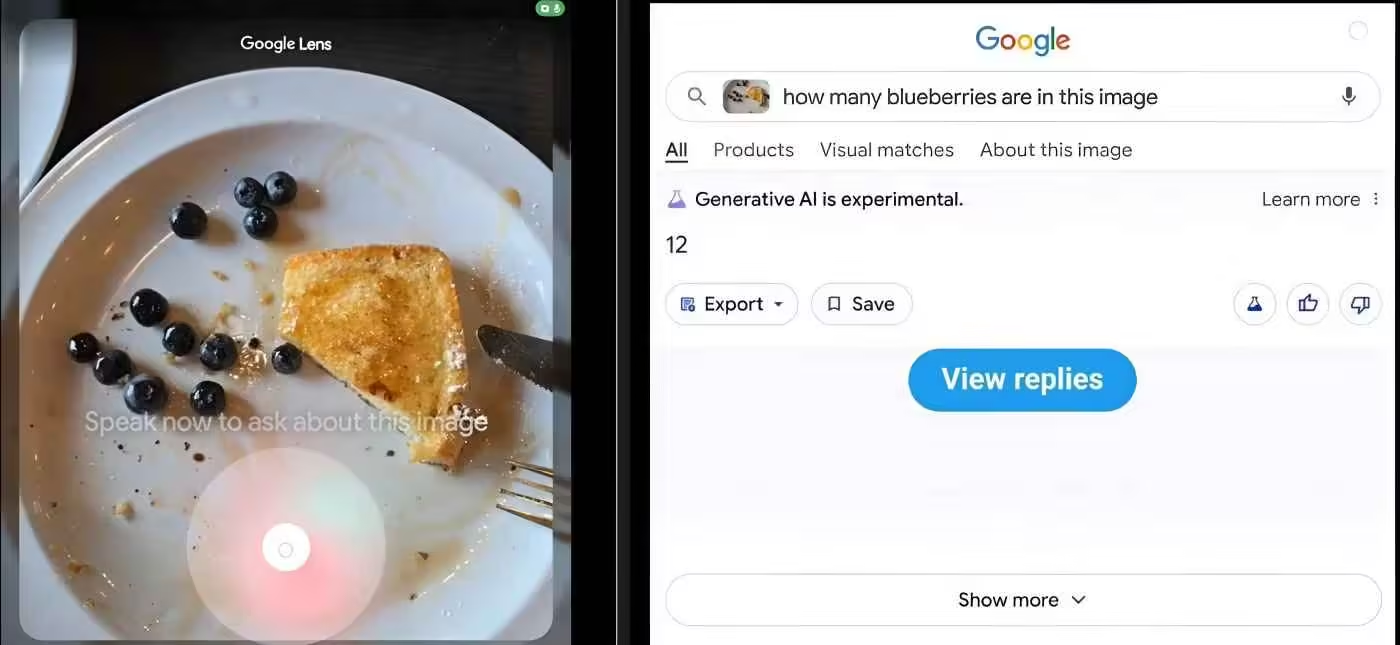
Google Lens Video Search

This Google Lens video search feature was first noticed in development in June of this year, so Google has rolled it out to the public pretty quickly. It was leaked that Google was working on an easier way to add extra questions to your search.

At the time, if you update the Google app to beta version 15.22.29.29.arm64, you will find that you can tap the shutter button in Lens to start a search, and then press and hold it to add voice context. Some code found in the app showed that Google was planning to call this feature “Search with video,” but the leaker couldn’t get it to work back then.

It looks like Google is enabling this feature through a server-side update. If you don’t see the feature on your phone yet, make sure you update to the latest versions of the Google app and Google Lens.

In the past year, Google has introduced several new ways to make searching on Android more useful by adding extra context. This improvement to Google Lens is another step in that direction, making it easier for users to find what they’re looking for by giving more specific information right from the start.

Watch out! Don’t Click Any Site and Email About Coronavirus
Best Boxing Training Apps to Learn Boxing in 2024
Best Houseparty Alternatives (Apps Like Houseparty) in 2023
Best Instant Loan Apps To Loan Money in Nigeria in 2023
Samsung Launches Jeans with Special Pockets for Putting Galaxy Z Flip3
TAGGED:Google Lens Search with videoGoogle Lens Speak now to ask about this image
SOURCES:Android Police
Share This Article
Facebook Whatsapp Whatsapp
Share
Miracle Emmanuel
ByMiracle
Follow:
A Crypto Analyst | Content Writer | Graphics Designer | Movie Freak | Currently learning Blockchain Development. I like Team Work. Connect with me using the buttons below. Want to advertise on Naijaknowhow Media? Please click here to send a message.
Previous Article Best Features to Look out for in the Recently Released Samsung Galaxy Watch 7
Next Article google_play_store Google Play Store May Soon Allow Users Update Third-party Apps
Leave a Comment Leave a Comment

Hey fam, don't go without a reply!Cancel reply

Ad imageAd image
- Advertisement -

Latest News

10 Best Web Hosting Companies in Nigeria (2026)
Internet & Data
May 13, 2026
Best Online Game Stores In Nigeria
5 Best Online Game Stores in Nigeria to Buy Video Games
Gaming
May 13, 2026
Prepaid Electricity Meter Tamper Mode
Meter Tampering: What Is Prepaid Electricity Meter Tamper Mode and How To Get Tamper Code in Nigeria
Tech Tutor
May 13, 2026
Play Solitaire Online
Best Websites to Play Solitaire Games Online for Free
Gaming
May 13, 2026

Stay Connected

5.9KFollowersLike
2.2KFollowersFollow
1.6KFollowersPin
1.2KFollowersFollow
1.9KSubscribersSubscribe
500FollowersFollow
637MembersFollow
NaijaknowhowNaijaknowhow
Follow US
© NAIJAKNOWHOW MEDIA (BN 2738473) | 2015 - 2025 All Rights Reserved.
  • About Us
  • Advertise
  • Banner Ads
  • Contact Us
  • Privacy Policy
  • Disclaimer
X
GET EXCLUSIVE CONTENT
SUBSCRIBE TO OUR CHANNEL