


Picking the best free DJ software for your PC can go a long way if you’re hoping to start a journey as a DJ or mixer or if you are just trying out some different sets of audio manipulation on your PC.
Just like there are varieties of mobile DJ mixer apps, there are also plenty of free DJ software programs out there for PC, but they usually have some sort of limitation or do not come with all the features that you need to be successful in the trade. While you need to upgrade or pay to access the best features of this software, you could get started with free versions, and these are not cracked or illegal versions (check these websites to download PC software for free).
There is free DJ software out there, and if you’re hoping to try out some on your Windows or macOS PC, we’ve got you covered. That being said, we’ve handpicked some of the best out there for you in this article on NaijaKnowHow.
7 Popular DJ Software Options:
Becoming a professional DJ comes with a price; aside from getting your physical equipment, you’ll still need DJ software to edit your songs, and at times you might want to convert audio files and so on. The good news is that the free DJ software that is listed below can handle such tasks. So without talking too much, let’s get straight to knowing the best free DJ software out there.
1. Virtual DJ

Highlights:
- Supports plugins and hardware controllers
- Over 100,000 tracks in its online library
- Powerful beat syncing and looping tools
Platform: Windows, macOS
VirtualDJ is one of the oldest and most popular on the market. It has a familiar, intuitive interface that allows you to mix your favourite songs with just a few clicks on your mouse and keyboard. VirtualDJ’s templates are designed to give you all the tools you need, from loops and effects to full MIDI control and even video mixing. VirtualDJ also has an extensive library of over 100,000 tracks from all genres, so there’s always something new to play.
While Virtual DJ is virtually free, you might consider getting a paid version, “VirtualDJ Pro”, which costs only $19 per month or a one-time purchase of $299 for VirtualDJ Pro Infinity. Essentially, if you are not using it professionally and do not intend to use any professional equipment such as a DJ controller or a DJ mixer, then VirtualDJ is 100% free. It can be downloaded from the official Virtual DJ website.
2. Serato DJ Lite

Highlights:
- Clean interface for beginners
- Comes with tutorials and tooltips
- Upgrade to Serato DJ Pro for more advanced features
Platform: Windows, macOS
Serato DJ Lite is a free DJ software available on both Windows and Mac. Its intuitive interface allows you to mix, scratch, loop, and cue with ease. It also has customisable effects that are perfect for every skill level. If you’re looking for an easy-to-use DJ application with lots of customisation options, Serato DJ Intro is the way to go.
The software offers a free version, “Serato DJ”, for beginners to explore, and the full version, “Serato DJ Pro”, of this software can be subscribed to for $9.99 per month or outrightly purchased for $249, but the free version should be okay for most beginners just starting out in the world of digital music production.
3. Mixxx

Highlights:
- MIDI controller support
- Built-in broadcasting tools
- Supports popular audio formats (MP3, WAV, FLAC, etc.)
Platform: Windows, macOS, Linux
Mixxx is a really amazing DJ software for PC that offers some great features, including beat making, seamless looping, effects support and a ton more that isn’t available on any other free program, including crossfaders, EQs, channel faders, looping controls, sound effects, samplers, slicers and many more.
Mixxx comes with many sample sound libraries, from rap to classical music, to give you a head start on your creations. The interface is designed with the user in mind, so it’s very easy to learn even if you’ve never used any other audio editing software before. Mixxx has been downloaded millions of times since its release date in 2001.
4. Ableton Live
Highlights:
- Drag-and-drop interface
- Full production suite with effects and instruments
- 30-day free trial for the Suite version
Platform: Windows, macOS
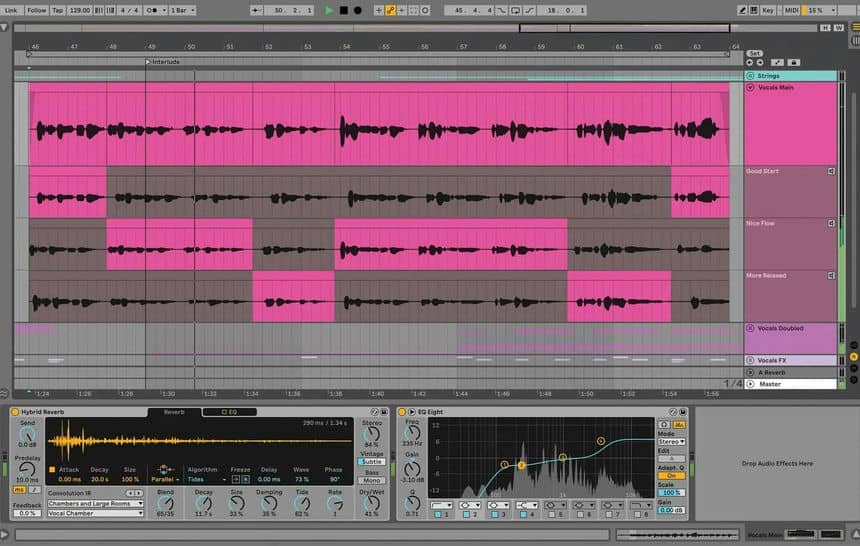
Ableton is one of the best-known music production software programs on the market. It’s been one of the most popular choices among DJs because it offers a vast range of features, including sequencing drums and basslines, mixing, mastering, live recording, and more.
It also integrates with other popular hardware like keyboards or drum machines. And there are numerous tutorials out there to help you get started. If you want a comprehensive suite of tools at your fingertips, Ableton Live is tough to beat. Ableton Live, however, has a suite version which can be tried out for 30 days; you might consider giving it a shot.
5. Rekordbox

Highlights:
- Easy music organisation and playlist creation
- Cloud library sync (premium)
- Free version available with solid features
Platform: Windows, macOS
If you’re looking for a free DJ software program, Pioneer Rekordbox is a great option. It’s been around for a while, and it’s available to both Windows and macOS users. This free DJ software program offers an easy-to-use interface that includes all the necessary features to manage music files, load tracks, create playlists, remix tunes, share your creations with other DJs, prepare video mixes, and publish your music online.
Has different plans that come with different features; you can opt for the free version, which can be used for as long as you want. Any upgrade might start at anything above $108 yearly and more, depending on your needs and features.
6. YOUDJ

Highlights:
- Web version available
- Auto beat matching and effects
- Touch-friendly interface
Platform: Windows, macOS, Web, Android, iOS
YOUDJ is a great piece of DJ software that’s offered as a free download on both Windows and Mac OSX devices. It provides users with over 50 built-in sound effects to choose from, which can then be customised and saved into up to eight different slots. It includes auto-beat matching, which makes it super easy for beginners to get started.
YOUDJ is certainly one of the top DJ software programs on the market because it comes with a range of features that are perfect for mixing, such as a mixer, effects, looping, and beat matching. You can as well download this software on your Android and iOS devices; it also has a web version that’ll let you mix tracks directly from your web browser.
Unlike the other software on this list, which mostly offers monthly and yearly subscriptions, YOUDJ offers a one-time fee if you choose to upgrade from the free version. These prices range from $5.90 for DJ Level 1, $19.90 for DJ Level 2, and $29.90 for DJ Level 3.
7. UltraMixer

Highlights:
- Supports MIDI controllers
- Real-time looping and auto-sync
- USB support for DJ hardware
Platform: Windows, macOS
Another popular free DJ software available to PC users is UltraMixer. It has a lot of features that beginners will love, including instant remix mode, where you can easily mix two tracks together on one deck at once. Additionally, it offers USB-MIDI support, which makes it compatible with most keyboards and controller devices.
This free software allows you to create seamless loops, which can be both edited and then recorded. You can add on effects such as EQ, echo, reverb, and beat repeat. The interface is user-friendly, and it comes with a drag-and-drop feature that makes it easy to create and mix audio. To get the pro version of this software, the full licence starts at €49.95.
Conclusion
Whether you’re just exploring DJing or looking for a free alternative to paid tools, the options above offer a great way to get started without compromising quality. From full-fledged suites like Virtual DJ and Mixxx to simple and fun tools like YOUDJ, there’s something for every aspiring DJ.
Have you tried any of these free DJ software programs before? Let us know your experience in the comments below.





