


Are you struggling with excess data and looking for a way to share it with your friends and family? Airtel Nigeria has made it easier than ever to do this. You can now transfer your data bundles to loved ones or even start a small data reselling business. With the Airtel data-sharing service, you can quickly share megabytes or gigabytes of your active data plan using a simple USSD code (other methods are included in this article).
Whether you’re looking to gift data or split your own bundle, this guide will walk you through the process, ensuring you know exactly how to share data on Airtel with ease. Let’s dive into the details on Naijaknowhow and help you start sharing data today!

Ways to Share Airtel Data
Airtel data sharing allows internet data bundles to be used by more than one customer in any of the following ways:
- Me2U: sending a bundle from your currently active bundle
- Gifting: buy a bundle for another line
- Airtel to Airtel airtime sharing.
- My Airtel App: Provides easy ways to share data through your smartphone.

Airtel Me2U:
- To share data (MB) on Airtel, dial *312#, then select asterisk (*) to go to the Next page. Alternatively, you can dial *312*14# to skip steps 1 and 2.
- On the next page, select 14 (Gifting & Sharing).
- Select 4 (Data Me2U).
- Select 2 (Send Me2U from existing data allowance).
- Enter the Recipient’s Phone Number.
- Lastly, enter your PIN to confirm the data share.
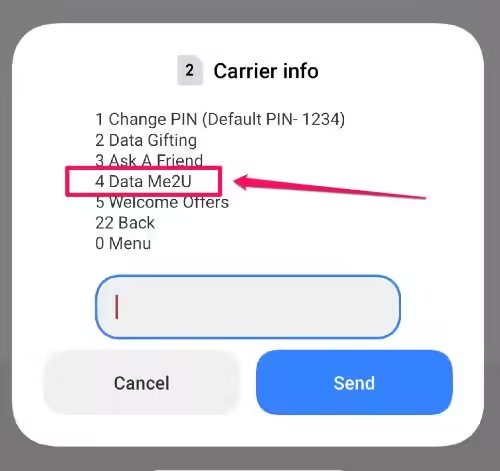
The data allowance shareable on Airtel Me2U is a maximum data size of 200MB per day and a minimum of 3MB. If you want to share more data with your loved one, then what you want to do is the second method (Data Gifting), which enables you to buy data for them instead of sharing your own existing data.
Airtel Data Gifting:
- To share data on Airtel Data Gifting, dial *321# to get started.
- Select 2 (Gift Data Bundle) and proceed to the next window.
- On the next window, select 2 (Data Gifting).
- Select the type of data you want to buy – monthly, weekly or daily
- Select your preferred data bundle
- Activate Plan
- Enter the Recipient’s Phone Number.
- Finally, enter your PIN to confirm the data transfer. Ensure you have sufficient funds to initiate the procedure.
Share Airtime (Alternative):
Alternatively, you can send airtime to the recipient by:
- Simply dial *321# > Select 1 (Airtel to Airtel) > Enter your PIN to confirm. This method helps you share the airtime required for the recipient to activate their preferred data plan.
Note: The default pin is 1234 and everything involved is totally FOC (Free of charge). The PIN must be changed before you can start sending or sharing data.
My Airtel App (Alternative):
Sharing and gifting data on the Airtel network just got way easier if you use a smartphone. My Airtel mobile app works well for these purposes – buying data and sharing from your existing allowance through Me2U.
- To get started, download the My Airtel app on the Apple Store or Google Play Store for Android users.
- Then proceed to sign with your phone number and verify accordingly.
- To buy data or share airtime with the recipient, just follow the steps below.
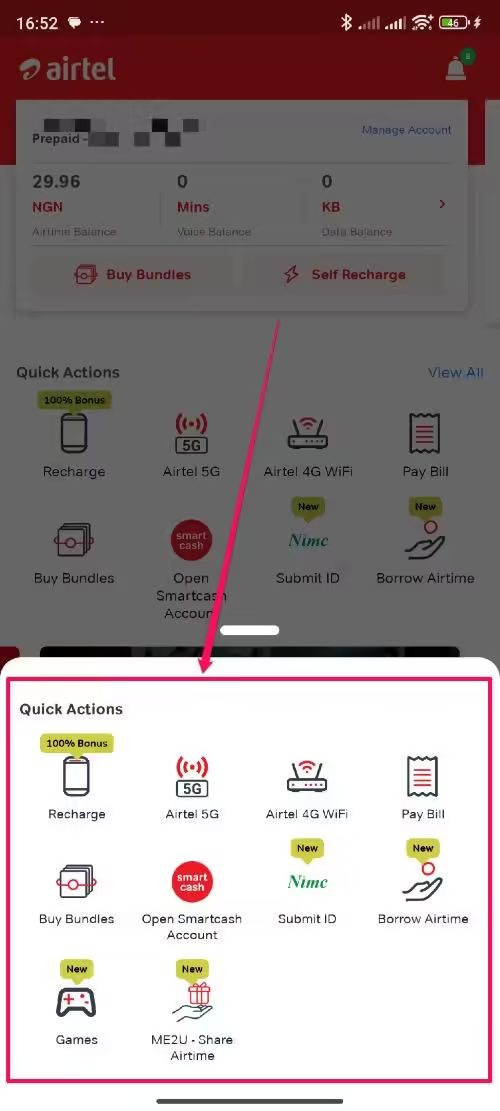
- To buy data: Click the “Buy Bundles” button in the “Quick Actions” section, then enter the recipient number, choose your preferred data plan and complete the transaction.
- To share airtime to help recipient recharge data themself: Navigate to the “Quick Actions” section then select View All. On the pop-up window, choose “Me2U – Share Airtime”, then fill in the form and follow the prompt to complete the transaction.
Changing Airtel Data Gifting & Sharing Default PIN
In order to prevent an unauthorised person from doing Data Sharing/Gifting from your phone, a PIN is required before you can share or gift data to anyone. When you access Data Sharing/Gifting for the first time, you will be required to change your PIN from the default PIN (1234) to any PIN you desire to use.
If you want to change your Airtel Me2U PIN, or in cases where you have forgotten it, then here is how to go about it:
- To change your Airtel Data Gifting & Sharing PIN, dial *321# > Select 3 for PIN Management >> and choose 1 for Change PIN or 2 for Forget PIN > then follow the prompt.
How to Share Data on Other Networks
Now that you know how to transfer data on Airtel, why not explore the additional resources on other networks in Nigeria below;
If you’re among those who do not want to purchase airtime to buy a cheap data plan, then you should see our post on how to manage your data plan to make it last a bit longer. Oh, one final thing… If the above data transfer code worked for you, don’t forget to drop a comment via the comment box to help this piece stay relevant and valuable.







Thanks for the info.
I’m try To gift data to someone, what is writting put recipent msisdn , what does that mean
Which pin are my requested to put?
Please how can I share my data. I don’t want to be sending her data, but just want us to use it together till it’s finish.
Pls how can I share data on air tel to airtel
Kindly check the article, it has been updated. Thanks for reading!
How can I transfer 1gb
Please how can I share my data,I don’t want to be sending her data I just want us to use it together till it finish.
This feature is not possible on Airtel, you can only do this on Globacom.
I can’t share more than 200mb in a day that’s too small is there a way i can share up to 1gb from the data that is already in my phone?
I tried gifting data.but its showing that the customer is not eligible
What should I do?
Its not showing Data Sharing. I’ve tried it so many times.. But its the same..
Here’s what you should dial below
*141#
press 6
press 3
and then follow the prompts after that
Hw can I buy bulk data and sell in airtel like mtn
I think you should contain Airtel for assistance.
Please I just tried it but its said that the customer is not eligible for the offer. What do I do?
Contact Airtel
What a good post. It really worked . thanks for the information
Glad I could help
The code Is not working
It is. Check your default password if you have not changed it in the past.
10x 4 d info,bt i wan ask does Airtel hve dat glo method of sharin whr u can register a no. dat can be using ur data wit u. witout posibly sharin in bits
Not at all
The code you gave isn’t functional
Thanks for sharing
Hi thanks for the info. You said that airtel data share allows one to share data in megabytes and gigabytes, but only gave the code for sharing in MB. How about the code for GB? Or can we still use thesame code?
Yup yup!
Thanks for the information. However, I need clarification on something, you said “However, also note that you will be unable to share Blackberry and Android bundle.”
So, which bundle are we actually talking about that could be shared?